Flash SaleInvest in your skills
'%3E%3Cpath fill='%23CDCCD8' stroke='%23CDCCD8' stroke-linecap='round' stroke-linejoin='round' stroke-width='1.5' d='M10.5 5.5C7.2 5.5 6 6.6 6 9.63 6 6.6 4.8 5.5 1.5 5.5 4.8 5.5 6 4.4 6 1.38 6 4.4 7.2 5.5 10.5 5.5'/%3E%3C/g%3E%3Cdefs%3E%3CclipPath id='a'%3E%3Cpath fill='%23fff' d='M0 0h12v11H0z'/%3E%3C/clipPath%3E%3C/defs%3E%3C/svg%3E) Accelerate your career
Accelerate your career
 TECHADEMY
Popular & Trending
 PMIPopularProject Management Professional (PMP) Certification
 i-Hub IIT PatnaTrendingAI & Data Science Certification Program from Vishlesan i-Hub Foundation IIT Patna
 i-Hub IIT PatnaTrendingAgentic AI Program from Vishlesan i-Hub Foundation IIT Patna
 TechademyPopularCertified AI Solutions Architect
 TechademyPopularCertified AI Native Project Manager
 TechademyPopularCertified AI Native Business Analyst
Agentic AI & Data Science
i-Hub IIT PatnaTrendingAI & Data Science Certification Program from Vishlesan i-Hub Foundation IIT Patnai-Hub IIT PatnaTrendingAgentic AI Program from Vishlesan i-Hub Foundation IIT Patna TechademyBest sellerCertified Agentic AI Engineering Program
 TechademyBest sellerCertified Agentic AI No Code Bootcamp
 TechademyBest sellerAI Forward Deployed Engineer (FDE) Transition Program
 TechademyAI ML Career Transition Program
 TechademyAI ML Interview Preparation Program
Artificial Intelligence
TechademyPopularCertified AI Solutions Architect TechademyAI Mastery BootcampTechademyPopularCertified AI Native Business Analyst
 TechademyCertified AI Native Marketing Accelerator
 TechademyCertified No-Code AI DeveloperTechademyPopularCertified AI Native Project Manager
 TechademyTrendingAI Native Product Manager Transition Bootcamp
 TechademyTrendingCertified AI Native Product Manager
 TechademyPopularCertified AI Native Scrum Master
Project Management


Agile Management
 Scrum AlliancePopularCertified ScrumMaster (CSM) Training & Certification
 Scrum AllianceBest sellerCertified Scrum Product Owner (CSPO) Certification Training
 ICAgileCertified Agile Coach (ICP-ACC) Certification
 Scrum.orgProfessional Scrum Product Owner (PSPO) Certification
 Scrum.orgProfessional Scrum Master (PSM) Certification
 Scrum.orgPSM A Certification Training Course
 Scrum AllianceBest sellerA-CSPO Certification Training
 Scrum AllianceAdvanced Certified Scrum Master (A-CSM) Certification Training
 Scrum AllianceBest sellerCSP-SM Certification Training
Cyber Security


BI and Visualization


IT Service Management


Cloud Computing


'%3E%3Cpath stroke='%23CDCCD8' stroke-linecap='round' stroke-linejoin='round' stroke-width='1.5' d='M16.63 9.5c-5.23 0-7.13 1.9-7.13 7.13 0-5.23-1.9-7.13-7.12-7.13C7.6 9.5 9.5 7.6 9.5 2.38c0 5.22 1.9 7.12 7.13 7.12'/%3E%3C/g%3E%3Cdefs%3E%3CclipPath id='a'%3E%3Cpath fill='%23fff' d='M0 0h19v19H0z'/%3E%3C/clipPath%3E%3C/defs%3E%3C/svg%3E) Hands-On Power BI Course
Hands-On Power BI CourseMicrosoft Power BI Training
Enhance your expertise in data modeling with 24 hours of hands-on training and 3 real-world projects.


Looking for more details? Download Brochure'%3E%3Cpath stroke='%23fff' stroke-linecap='round' stroke-linejoin='round' stroke-width='1.5' d='M3.33 14.17v1.66A1.67 1.67 0 0 0 5 17.5h10a1.67 1.67 0 0 0 1.67-1.67v-1.66m-10.84-5L10 13.33l4.17-4.16M10 3.33v10'/%3E%3C/g%3E%3Cdefs%3E%3CclipPath id='a'%3E%3Cpath fill='%23fff' d='M0 0h20v20H0z'/%3E%3C/clipPath%3E%3C/defs%3E%3C/svg%3E)
'%3E%3Cpath d='M3.07 12.87a7.5 7.5 0 1 1 13.86-5.74 7.5 7.5 0 0 1-13.86 5.74'/%3E%3Cpath d='m7.5 10 1.67 1.67 3.33-3.34'/%3E%3C/g%3E%3Cdefs%3E%3CclipPath id='a'%3E%3Cpath fill='%23fff' d='M0 0h20v20H0z'/%3E%3C/clipPath%3E%3C/defs%3E%3C/svg%3E) Elevate your market value with sought-after analytical skillsUnlock actionable insights with advanced Power BI skillsCurriculum aligned with PL-300 Certification exam
Elevate your market value with sought-after analytical skillsUnlock actionable insights with advanced Power BI skillsCurriculum aligned with PL-300 Certification exam
 24Hours of live training
 3Real-world projects
 38Hands-on exercises
 255Assessment questions


 Join 750k+ learners
' d='M7.08 1.27a.6.6 0 0 0-.5 0 1 1 0 0 0-.24.24l-.17.32-1.25 2.53-.04.08-.09.02-2.8.4-.34.06a.6.6 0 0 0-.31.16.6.6 0 0 0-.15.47c.01.14.09.24.15.31l.25.26 2.03 1.97.06.06-.02.09-.47 2.78q-.05.21-.05.35-.03.16.05.35.13.23.4.29a.6.6 0 0 0 .34-.06l.32-.15 2.5-1.32.08-.04.08.04 2.5 1.32q.18.1.32.15a.6.6 0 0 0 .35.06.6.6 0 0 0 .4-.3.6.6 0 0 0 .05-.34q-.01-.15-.05-.35L10 8.24l-.01-.09.06-.06 2.02-1.97q.15-.14.25-.26a.6.6 0 0 0 .16-.31.6.6 0 0 0-.15-.47.6.6 0 0 0-.31-.16l-.35-.06-2.8-.4-.09-.02-.04-.08-1.25-2.53-.17-.32a1 1 0 0 0-.24-.24'/%3E%3Cdefs%3E%3ClinearGradient id='a' x1='1.07' x2='12.17' y1='6.83' y2='6.83' gradientUnits='userSpaceOnUse'%3E%3Cstop offset='.68' stop-color='%23FEBC3B'/%3E%3Cstop offset='.69' stop-color='%23FEBC3B' stop-opacity='0'/%3E%3C/linearGradient%3E%3C/defs%3E%3C/svg%3E) 4.8/5 (7,900+ ratings)
4.8/5 (7,900+ ratings)Community

Unlock Your Data Analyst Superpowers


Expert-Led Training
24 hours of live training by a celebrated industry expert, spread across several days.

On-Demand Learning
15+ hours of self-paced, on-demand learning alongside the live sessions.

Practical Learning
A hands-on, practical course: from the first days you navigate Power BI, connect to data sets and export reports.
3 Real-World Projects
A portfolio of 3 real-world projects that simulate the challenges data professionals face today.

38 Exercises
Learn by doing with 38 hands-on exercises, spread across the course.

Assessment Questions
255 Power BI assessment questions to test yourself on challenging data analytics problems.

PL-300 Aligned
A curriculum aligned to the Microsoft Power BI Data Analyst (PL-300) certification exam.

Visualization Tools
10 data visualization tools to practice with, turning raw data into compelling visual stories.
The Techademy Edge

100% Practical Learning
Engage in 24 hours of hands-on learning, diving deep into Power BI's practical applications.


Industry-Aligned Curriculum
As a Microsoft Partner, our curriculum is aligned to Microsoft Data Analyst Exam (PL-300) to boost your exam success rate.

Assessment Questions
Get ready for 255 challenging data analytics questions that put your Power BI knowledge to the test.

Beginner-Friendly Approach
Modules take you through connecting data files and navigating Power BI, tailored for those new to the platform.

Master Time Series and Hierarchies
Identify trends and make forecasts with exercises on time series analysis and hierarchical data structures.

Hands-On Exercises
Solidify your learning with 38 exercises spread across the course, so you apply what you learn in real time.
Tuition Fee
Live Online Classroom
 24 hours of expert-led live training
- 3 real-world capstone projects
- 38 hands-on practice exercises
- 255 Power BI assessment questions
- 10 data visualization tools
- Curriculum aligned to PL-300

Curriculum for Power BI Data Analysts
Ten modules, from the basics of data analysis to Python, machine learning and SQL.
Introduction to Data Analysis and BI Tools
The fundamentals of data analysis and business intelligence tools, with the concepts and practical skills to interpret data and set up your tools.
- Welcome and Course Overview
- Basics of Data Analysis
- Overview of BI Tools and Setting Up the Environment
Data Preparation and ETL Fundamentals
Data sources and types, data cleaning and pre-processing techniques, and an introduction to Extract, Transform, Load (ETL) tools for managing diverse data sets.
- Understanding Data Sources and Types
- Data Cleaning and Pre-processing Techniques
- Introduction to ETL Tools
Data Modeling and Basic Visualization
Data modeling principles, crafting basic visualizations and storytelling with data, so you can present insights as clear visual narratives.
- Data Modeling Concepts and Practices
- Creating Basic Visualizations
- Storytelling with Data
Intermediate Data Transformations
Start designing interactive dashboards, and learn to bring user feedback into your visualization design.
- Designing Interactive Dashboards
- Implementing User Feedback into Visualization Design
Interactive Dashboard Design
Create engaging, interactive dashboards built around their users, so your data presentations support effective decisions.
- Designing Interactive Dashboards
- Implementing User Feedback into Visualization Design
DAX Fundamentals
Data Analysis Expressions (DAX) in BI tools: the common functions and their practical uses in data modeling and analysis.
- Introduction to DAX in BI Tools
- Common DAX Functions and Their Uses
Advanced DAX and Analytics
Advanced DAX functions and the analytical techniques they make possible, for in-depth data analysis and insights.
- Deep Dive into Advanced DAX Functions
- Analytical Techniques Using DAX
Publishing and Power BI Service Integration
Publishing reports and dashboards, and using Power BI Service to share and collaborate on data-driven insights.
- Publishing Reports and Dashboards
- Using Power BI Service for Collaboration
Advanced Features and Mobile BI Strategies
Data gateways, Mobile BI considerations, and the security and administration features for managing data access in BI environments.
- Data Gateways and Mobile BI Considerations
- Security and Administration Features
Python, Machine Learning, and SQL Integration
The basics of Python for data science and of machine learning models, and how to integrate SQL with BI tools for advanced analysis.
- Python for Data Science Basics
- Introduction to Machine Learning Models
- Integrating SQL with BI Tools
M Language and Automation
The essentials of the M language for transforming data, and how to automate data processing and reporting with it.
- M Language Essentials for Data Transformation
- Automating Data Processing and Reporting
Final Project and Wrap-up
Build a final project to the course guidelines, review it in a Q&A session, and leave with clear next steps for applying your skills.
- Final Project Guidelines and Development
- Review and Q&A
- Course Conclusion and Next Steps

What Power BI Learners Are Saying
What learners say about the hands-on exercises, the instructor and the dashboards they now build.


Transforming data into impactful insights!
The Power BI course was fantastic! It transformed my data analysis skills, and I now can create insightful dashboards that drive decision-making.

Making data visualization accessible and fun!
This training was engaging and informative. The hands-on exercises helped me understand Power BI tools, making data visualization easy and effective!

Building confidence in data storytelling!
I loved the structured approach of the Power BI course. The instructor provided clear explanations, which boosted my confidence in using the software.

 Google
 Trustpilot
 Course Report
Still have a question? Get in Touch with our Experts
Not sure the Power BI course is right for you? Our advisors are one click away, with no obligation to enroll.
The PL-300 Certification
Questions about Microsoft's PL-300 certification: what it is, who can take it, what it costs and how long it takes to prepare.
01What are Power BI certifications?
Microsoft conducts a Power BI Data Analyst Certification (PL-300) exam. Once you pass the exam, you are granted Microsoft Power BI Data Analyst Associate certification, which you need to renew every 12 months. Our training experts at Techademy have prepared a curriculum which stays aligned with Microsoft’s PL-300 exam.
02Does Microsoft offer a Power BI certification?
Yes, Microsoft offers Microsoft Power BI online Certification.
- Certification Name: Microsoft Power BI Data Analyst (PL-300)
- Skills Measured: The exam measures your ability to:
- Prepare the data (25-30% of the exam),
- Model the data (25-30% of the exam),
- Visualize and analyze the data (25-30% of the exam)
- Deploy and maintain assets (15-20% of the exam).
- Exam Release Date: The PL-300 exam was released in February 2023 and replaced the old exam DA-100: Analyzing Data with Microsoft Power.
- Cost: The exam cost varies according to the country you are taking the exam in. For example, the exam costs $165 in the United States.
- Duration: 100 minutes
- Number of Questions: 40-60 multiple-choice questions, including one case study
- Passing Score: To pass the exam, candidates need to achieve a score of at least 70%.
03What is the eligibility criteria for Power BI certification?
Anyone with basic computer literacy and a fundamental understanding of data concepts can attend this Power BI certification online. However, proficiency in English is recommended since the Power BI training will be imparted in English at Techademy.
As a technical requirement, you should also install Power BI Desktop on your Windows PC for practical, real-world learning through capstone projects.
04Are there different levels of Power BI certification?
You can start with Microsoft Power BI Data Analyst Certification (PL-300) with Techademy. Once you get certified as ‘Power BI Data Analyst Associate’ after passing the PL-300 exam, you can consider the following certifications:
- Microsoft Certified: Azure Enterprise Data Analyst Associate
- Microsoft Certified: Power Platform App Maker Associate
- Microsoft Certified: Customer Data Platform Specialty
- Microsoft Certified: Power Platform Solution Architect Expert
05How much does the Microsoft Power BI certification cost?
Microsoft charges $165 in the United States and Rs. 4,800 in India. However, the cost varies depending on the country or region you are taking the exam in. Once you complete the Microsoft Power BI certification course online with Techademy, you will be more prepared to sit for the exam.
06What does the PL-300 exam cost in India and the US?
According to the Microsoft site, the PL-300 Power BI certification costs $165 in the US and Rs. 4,800 in India. However, it may be subject to change over time. It is advisable to visit the Microsoft certifications page before you sit for the exam. Once you enroll in our Microsoft Power BI course at Techademy, our learning advisors will keep you posted on the latest updates.
07How do I prepare for Power BI certification?
When you attend Power BI course online at Techademy, we have full-fledged 24-hour expert-led training and 15+ hours of self-paced learning by Nikolai Schuler. You get your theoretical knowledge from experts' instructions to pass the exam. Then, you can put into practical learning through our real-world capstone projects, practical exercises, assessment questions.
08How long does it take to prepare for the Power BI exam?
The Power BI course involves 24 hours of instructor-led training. There are many other learning resources offered along with this course. Since those elements are self-paced, the time it takes for you to utilize these resources will depend on your level of capability and experience.
The Power BI exam lasts for an hour and forty minutes. If you have a background as a data analyst and have worked with Power BI before you will be able to get certified within a week or two. If you do not have this background, then it may take a few months for you to get comfortable with the conceptual and practical aspects of using Power BI for Data Analysis and get certified by passing the exam.
What you will learn
Six skills, from getting data out of its sources to building, calculating and optimizing a data model.
Get Data from Data Sources
Learn to identify and connect to diverse data sources, modify settings, and choose between datasets.
Clean the Data
Learn to evaluate data statistically, resolve inconsistencies, and address data import errors.
Transform and Load the Data
Learn to handle data efficiently by refining queries, designing star schemas, and more.
Design and Implement a Data Model
Learn to implement role-playing dimensions, define relationship cardinality, and more.
Create Model Calculations Using DAX
Gain expertise in developing and implementing aggregation measures, time intelligence measures, and more.
Optimize Model Performance
Learn performance optimization techniques such as utilizing Performance Analyzer and selecting optimal data types.
Eligibility

Prerequisites for the Microsoft Power BI Training

Anyone with basic computer literacy and a fundamental understanding of data concepts can attend this training.
Proficiency in English is recommended, since the training is delivered in English.
You should also install Power BI Desktop on your Windows PC for the hands-on capstone projects.

This course is for you
For analysts, engineers, scientists and administrators who work with data, and for students and freelancers learning Power BI from the basics.
Data Analysts
Database Administrators
Business Analysts
Data Engineers
Students and Freelancers
Data Analytics Enthusiasts
Data Scientists
Consultants
Get Power BI Certified
Validate your Power BI expertise
Completing the course validates your ability to run efficient data visualization processes in Power BI.
Prepare for the PL-300 exam
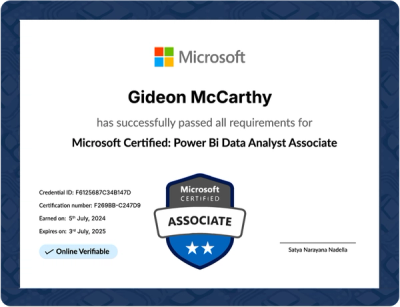
The curriculum is aligned with PL-300, the exam you pass to earn the Microsoft Power BI Data Analyst Associate certification.
Stand out in the job market
An industry-recognized Power BI certification raises your chances of being noticed and selected in interviews.
Certification
Create a Job-Ready Project Portfolio
Apply and integrate the data analysis skills and techniques you learn in Power BI. Each project is designed so you put the knowledge and skills you gain in the program to work on a real-world problem.

An Award Winning End-to-End Talent Solutions
Our cutting-edge platform empowers businesses to strategically hire, develop, and retain top talent.
Retail Expansion Strategy
Use Power BI to analyze the data behind a retail expansion strategy.

Hospital Resources
Apply your data analysis skills to optimizing hospital resources.
Marketing Campaigns
Bring your Power BI skills to the analysis of a marketing campaign.

Proof for Recruiters
Present the finished portfolio to recruiters as proof of your abilities.
Top Companies Rely on Us to Upskill Their Workforce